Showing posts with label HOW-TOs. Show all posts

Monday, June 24, 2013

How to prepare for TCS IT WIZ

TCS IT Wiz, the country's most prestige and biggest IT quiz event, is an annually organised IT quiz by Indian IT giants TCS. Winning it has been a dream for many. It has been for me too and is still. This quiz changed my life. It made me what I am today - a techie, tech geek or tech savvy  or whatever you like to call. Only to prepare for this quiz, I started Tech Biscuits back in 2012 and that too during my school exams.

Enough of dud talks. Let's back back to the point- 'How to prepare for TCS IT Wiz'. The  best way is to read tech blogs daily. Also search for funny IT facts because these are asked often. If you can give more time to preparation, then better buy Blitz The IT quiz book. Here is the link. Contact Raveesh Mayya, he might as well give you a discount as he is the author.

For the @TCS round, just go through official site of TCS and learn more about it from there only. Keep your tech quotient up to date and keep reading Tech Biscuits


Monday, November 12, 2012

How To Download video from Youtube without any software

Downloading video from Youtube , for some, is a very tedious task. Genrally we use different softwares to download videos. But here's an alternative :


  • Search the video in Youtube. After searching, right click on your video (don't open it ), then click on copy link address.

  • Open KeepVid (keepvid.com).
  • Paste the video url here. Click on download.
  • A Java update bar will come on the top ( if you're using Chrome). Click on "Run this time".

  • KeepVid will show the available video formats. That Java bar will once again come up. Again click on "Run this time".

  • Click on the desired Video format. Then a save dialog box will appear. Click on save.


Friday, October 26, 2012

How To Upgrade your Computer to Windows 8


If you are planning to make the switch to Windows 8 this weekend, here are 3 things you would need:

  • A Windows machine running Windows 7, Vista and Windows XP. It doesn’t matter if you have computer is running Windows XP Premium or Windows 7 Home Basic.
  • A valid credit card or a PayPal account to pay the upgrade fee – you will be required to pay $39.99 for the Windows 8 Professional edition.
  • An internet connection for downloading the Windows 8 installer (2.05 GB). You may also order the Windows 8 installer on a DVD though it may not be necessary as it is quite easy to create your own Windows 8 DVD.

Sunday, September 16, 2012

How to open two VLC at the same time

To open two VLC media players at the same time, follow these steps: 


  • Open VLC. Go to Tools -> Preferences (Shortcut key - Ctrl + P)
  • In the bottom left corner, you will see 'Show Settings' tab. Select 'All' ( see the image below)
  • Choose the 'Advance; option from the menu at the left.( see the image below)


  • Under the 'Performance Options', remove the tick from 'One instance when started from file'.( see the image above)
  • Click Save and now you can open two VLCs at the same time

Tuesday, September 11, 2012

Buying a Digital Camera: Things to Know

Buying a digital camera is a very easy work. All you need to do is to know some basics of camera features. But first see my photography blog World Behind Lenses. I took all pics with a basic point and shoot camera Canon A3100 IS.  Now let's get back to the topic. Look for these 5 things in a digital camera :-


ISO


ISO helps you to take pictures in low light. The greater the range of ISO, the better pictures and can be taken. A normal digicam should have ISO range of 80 to 1600. Try looking for greater ISO. Nowadays, you can easily get 1600+ ISO range cameras for a cheap price. Remember, the greater the ISO, the better pictures can be taken. So try buying camera with 1600+ ISO range (i.e., 80-3200 ISO).


Macro


One of the key feature of a camera. Macro mode allows you to take splendid Macro Photos. I love Macro modes. Look for macro modes in a camera. The average macro range of a camera should be between 1 inch to 3 inch. Remember, the smaller the macro range, the better it is because you can focus objects as close as the macro range is. For example, if macro range is 1 cm, you can take a sharp and good quality pic of an object placed at a distance of 1 cm from the camera lens. Nowadays, you can easily get cameras having macros between 1 inch to 3 inch


HD Video Mode


HD videos are becoming popular. So look for HD digital cameras. You can find them easily.


Shutter Speed


The average shutter speed for a camera should be 1/1600th part of a second. Very fast indeed. But try looking for even a faster shutter speed like 1/2000th or even less. The faster the shutter speed, the sharper the picture can be taken for a moving object.


Optical Zoom


Everyone is familiar with this term. Look for camera with 5x or 5x + optical zoom.


Important Note


Buying a camera certainly depends on your purpose. Buy a DSLR if and only if you are taking photography seriously. If you are thinking of buying a DSLR just for hobby photography, then better go for mirrorless cameras beacuse they are the future of camera technology. Choose Olympus Pen E-PL5. Mirrorless cameras are just awesome, to sum up in a line "a rocket in your pocket". And if you are having a smartphone and still want to buy a basic and simple digital camera, then don't. Since nowadays all smartphones comes with good cameras and HD video recording, so mostly all features are similar to those of a digicam.

Remember, photography doesn't depend on the type of camera you use. It depends on your way to compose a snapshot. Camera just acts as a source to capture your composed way of looking the subject.

Saturday, September 1, 2012

How to Beat Facebook Addiction

When addiction word comes, we all think about alcohol, cigarettes, drugs and other narcotics. But in 21st Century, the era of Internet or more accurately the era of social networking, the most addicted thing is none other than Social Networks like facebook,  twitter, youtube, pinterest, myspace.....the list is endless. Millions of us are addicted. The Government tells us that our time wasting internet addictions are costing the country billions of dollars every year. Our productivity at work is dismal because we spend most of the day reading our Fun Wall or checking out our favorite blogs. Can this additive behavior be beaten?

The answer is Yes.


Maybe your affinity for Facebook began with a simple desire to keep in touch with your friends, or make new ones online. Maybe you were just bored. But now, you're finding it difficult to spend an hour of your waking life without checking or thinking about Facebook. Here's how to help yourself quit.


Try this quiz yourself. It will tell you how much facebook rules your life.

In this article, I will show you some ways to reduce you facebook addiction to a normal level. I found these steps in The Daily Mind and WikiHow


How to tell if you are facebook addict


1. You are behind schedule because you are on Facebook
If you are ever late because you were checking your updates on Facebook or watching a related video on Youtube then you know you are addicted. This is classic addict behavior. It is time to get help.

2. You think about it when you are offline
I have several friends who struggle to get to sleep because they are thinking about the latest game or wondering how their website statistics are looking. If you do this then it could be a sign that you are heading towards a problem.

3. Your friends and family comment on your excessive internet use
When other people around you start to notice that you have a problem it is generally a pretty accurate indicator that you are losing it. If your mates, coworkers or family members have made comments about how much you use the net then you need to read the rest of this post.

4. You check your accounts from your Mobile
If you use your Mobile for monitoring your social media accounts then you need help.

5. You get stressed when a Facebook “friend” doesn’t add you
Have you ever noticed yourself getting stressed over something that has happened on Facebook or Myspace? Do you ever feel like your online life is more real than your offline life? If you have been stressed about what rapper you turned out as or what magic egg someone sent you then it is time to open your eyes.

How to beat facebook addiction


1. Admit that you have a problem: Take a deep breath and then repeat this out a loud – even if you are in your office or an internet cafe.

“I have an internet addiction problem.”

Good. Now that you have acknowledged your problem we can proceed. There is no point in trying to beat an addiction if you do not seriously believe that you have one. This is important.


2. Track your usage: Keep tabs of what you actually do on Facebook. After every session, ask yourself, "What did I just accomplish by checking Facebook?" Odds are, you're probably just logging in to see if you've been poked, check for updates, write a new note, add a song, and other mindless tasks you do to waste time — even if you logged in for a set purpose, like accepting a friend request.

3. Follow a Facebook schedule: For each Facebook goal, write down how much time and at what frequency you'll need to be on the site to achieve that goal. Then, write down the total number of hours per week that you should be spending on Facebook.
  • If it seems like too much time, adjust your activity times accordingly.
  • Following this schedule might bring your Facebook addiction under control without requiring you to quit altogether.
  • Look at this example schedule for inspiration:
  • Staying in touch with [[Make Friends in College|college — Check every other day; spend no more than 15 minutes responding to messages only from college friends (1 hour per week)
  • Maintaining a group — Check every morning and evening for 10 minutes each, only to remove any spam or junk. Note to self: do not respond to posts, comments or messages during this time (2 hours, 20 minutes per week)
  • Keeping a group interesting — Spend 30 minutes every other day reading all of the comments and responding (2 hours per week)
  • Finding new friends — Browse profiles for 30 minutes, twice a week (1 hour per week)
  • Total time I plan to spend on Facebook per week: 6 hours, 20 minutes
4. Focus on the other activities you're neglecting: If you find yourself spending, say, 10 hours a week on Facebook, make a list of all the other things you could accomplish in that time.

5. Turn off email notifications: Email notifications are like little red devils coming to sit on your shoulder and begging you to come back and visit Facebook. Turn them off. You don’t need to be notified every time someone sends you a message. If it was that important they should email you or, God forbid, use the telephone. You also don’t need to be notified every time someone rates your sexiness, adds a fish to your aquarium or sends you a new bumper sticker! Turn off email reminders so you can get on with your work.

6. Meditate as soon as the thought arises: One of the most powerful ways to beat Facebook Syndrome is to look directly at the tempting thought as soon as it arises in your mind. You do not need to judge it or try to push it out – just look at it. The thought might arise as a worrying thought that begs you to check your updates so you don’t offend anyone. Or it might appear as a carefree thought saying that one quick look won’t hurt. Whatever it arises as the meditation is to just look at it. When you can do that the power of the thought will be drained well and truly.


7. Leave Facebook: If you've created a schedule but can’t stick to it — or if you've decided that any time spent on Facebook is wasted — you may need to quit cold turkey. This is a last resort and is easier said than done.

  • There are two options here: you can either deactivate your account, which lets you take a breather without losing any information, or permanently delete your Facebook account, which is the real deal.
  • If you've started any groups, transfer admin rights to someone you trust.
  • Send an email to your Facebook contacts explaining your decision to leave. Include your current contact information so they can get in touch with you without Facebook.
  • If you plan to permanently delete, clear every last bit of information from your profile. Don't forget to remove your photos!

Friday, July 13, 2012

How to create 3D Facebook Covers


Wanna create cover like this

Though they are not 3D facebook covers, but I like to call them 3D Facebook Covers. You can also save yourself a trouble of creating this. Just like TechBiscuits Facebook Page and you will get a 3D cover (leave comment in this post or message Tech Biscuits if you want a 3D cover). So now to create them, follow these steps (in this tutorial, I am going to show a three layer cover. You can create the above cover by creating several layers.):
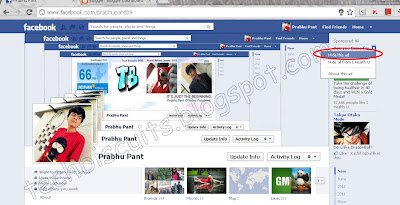
  • First of all you are required to take screenshot of you facebook profile page. Make sure that all the ads are hidden. To take screenshot, open you FB profile page and press Print Screen.

Closing the ads. After Closing, refresh this page.

  • Now go to Photoshop. Press Ctrl+N to open a new blank workarea.  Paste the screenshot in this box.
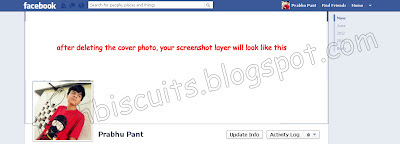
  • Now you need to erase the portion where your cover photo is displayed. You can use eraser or rectangular marquee tool.  After erasing, make a copy of that image.

After Erasing the cover photo area


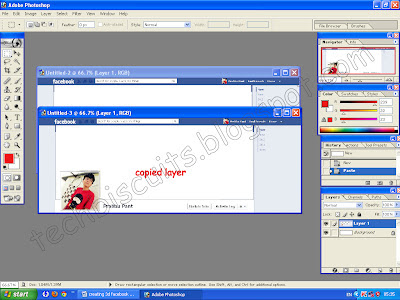
Making Copy of the base image

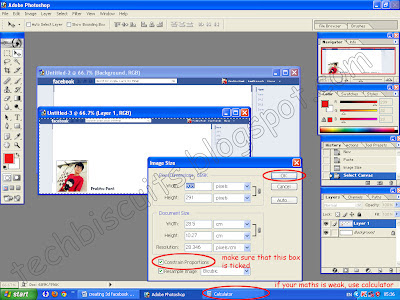
  • As you can see, the so called ‘3D’ look is on the cover photo area and the copied image (which you have created in the end of step 3) is smaller than the base image. So you are now required to reduce the size of the copied image by 197 pixels. Go to Image-> Image size and reduce the size of the copied image by 197. Make sure that the Constrain Proportion box is ticked.

Adjusting the layer's size


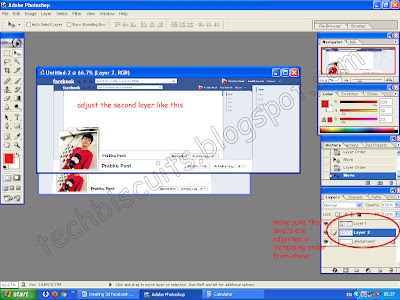
  • Now place the copied image in the box of base image. Make sure that the layers are adjusted in increasing order from the top (see the small box in the bottom right corner of the image below.) You can adjust the layers by simply drag and drop.

Adjusting layers


  • After the layers are adjusted, adjust layer 2 in layer 1 as given in the image.

The video of this How-To tutorial will be uploaded soon, so stay tuned for updates.

Wednesday, July 11, 2012

Keep your children safe online

There are many reports on the web that will tell you why social networking websites are not safe for the children. Cyberbulling and trolling are commonly cited problems and concerns about social networking. In fact, Facebook, the largest social networking website, had triggered controversy when it revealed it plans to open the network to preteens. To address these concerns, students of Ben-Gurion University have developed a free Facebook application called Social Privacy Protector (SPP) app that helps parents protect their kids from pedophiles and criminals online.


The SPP app comes with multiple level of protection. However, the most important one is that helps parents monitor their children's friends lists in seconds, and detect persons who have no mutual link, or have fake profile. The app also issues notifications to users about the dubious apps installed on their Facebook Timeline.


Michael Fire, doctoral candidate at the Ben-Gurion University of the Negev is quoted as saying, "An important feature of our app is the ability for parents to better protect their kids' privacy with just one click instead of having to navigate the more complicated Facebook privacy settings.”


Users can use the app as a Firefox extension as well. To know more about the app, click here. Check out the video below to get a preview of how the app works:


It is hard to say how effective this app is going to be against cyber criminals, but it's definitely a welcome initiative. We've already heard about numerous sad stories about the adverse impacts of social networking on our lives. Recently, the University of Salford came up with an eye opening survey that revealed social networking websites were feeding us with anxiety and even making us insecure.


Source:- ThinkDigit

Monday, June 25, 2012

Find the location of your train with SMS

According to a latest development by the Indian Railways, one can now trace the location of his train by SMS.


Type the train number and SMS it to 09415139139 or 09664139139, and you will soon have the exact location of a train on real-time basis. 

Friday, June 22, 2012

How to open blocked websites

You can open blocked websites using proxy servers. A proxy server is a website service that allows you to browse through websites from their Internet connection. It means tunneling through the Internet connection into another PC somewhere in the world, and accessing websites or downloading files using their Internet connection. The browsing or downloading speed totally depends on their Internet connection speeds and the number of people accessing the service during the given time. Proxy servers are hosted by common or unknown people who have a (possibly) high-speed open Internet connection in their home or office.
Few Proxy Websites are:


  • Vtunnel.com
  • Ltunnel.com
  • n-tunnel.com
  • freetoview.com
  • overridewebsense.com
  • apchemistry.info
  • UnseenIP.tk
  • weddingface.info
  • anonymise.us

Tuesday, June 19, 2012

How to recover scratched CD


To recover a scratched CD, follow these steps:


  • Spread a cloth on a flat surface and place the CD on it. 
  • Then, hold the disc with one hand, use the other to wipe the polish into the affected area with a soft cloth. 
  • Wait for it to dry and buff using short, brisk strokes along the scratch, not across it. 
  • A cloth sold to wipe spectacles or camera lenses will work super. 
  • When you can no longersee the scratch, wash the disc with water and let it dry before playing. 


BEWARE OF THESE

  • Fingermarks/prints cause 43% of disc problems.
  • General wear & tear causes 25% of disc problems.
  • Player-related issues cause 15% of disc problems.

Sunday, June 17, 2012

How to increase droid's battery

To increase the battery of your brand new Android Smartphone, follow these steps:


Switch off unncessary antennas : Antennas consume a lot of battery. So it is advisable to switch off unnecessary services like Blutooth, GPS and Wi-Fi when you are not using them. It's best you turn off your 3G antenna in places where the service is patchy since your device will constantly seek a 3G network, thereby draining the battery.


Manage Screen Brightness : Manually set display level to between 30 and 40 percent.


Free up RAM :  Use the built in task manager app to regularly free up your phone's memory. If your device does not comes with such a tool, download the free Advanced Task Manager from Google Play Store.


Use a wallpaper with dark colors : Dark-colored themes and wallpapers reduce the battery usage, especially in devices with AMOLED screen.


Disable sync : Disable push notifications in apps like Facebook, Twitter, etc. Instead, set specific update intervals, such as 15 mins, depending on your usage.


Get paid apps : Free apps tend to take a heavy toll on the battery life.


Check Battery Usage: Go to you phones setting and see which app consumes most battery and take a call on which you should install.


Keep it cool : Heat lowers the battery life of a smartphone. Take care to keep phone away from hot areas like your car's dashboard.


Saviour App : Use Juice Defender. It allows you to set rules such as switching off 3G and connecting to Wi-Fi, etc,

Monday, June 4, 2012

Get Facebook on Mobile Without the Internet

You can use your Facebook account in India by dialing *325# (or *fbk#) from your mobile phone – this service requires no data plan or Internet and it will even work on phones of the Stone Age. For the complete tutorial see Digital Inspiration.


If you have a phone with web access, just enter m.facebook.com into your mobile internet browser. On most phones, you can access the internet browser from your phone's menu. There's no extra charge for using Facebook on your phone if you already have a data plan. However, your normal data rates will still apply. Check with your mobile service provider to find out what plans are available.

Friday, June 1, 2012

How to trace location from a email

In this tutorial, I am going to show you how to find sender's IP address from a email. I am using a G-Mail ID to demonstrate this. The way of finding IP is same for all email providers like yahoo, hotmail. If you have any problem, you can write to me or leave a comment in this post. You can also write on the wall of Tech Biscuits facebook page. 


Now follow these steps:

  • Log in to Gmail and open the message.
  • On the right hand side, you will see the date. Click the adjoining arrow. A drop down menu will appear


  • Now click on "Show Original". A new tab will open up.(see the image above)
  • This tab will be full of codes that will blow your brain. Now see the 5th or 6th line.
  • You will find the sender's IP address. (see the image below)


  • If the IP address is private, you can't trace them. If you want to know more about private IP address, click here.
  • Now open this site
  • Paste the IP and bingo, the IP address location will appear

Wednesday, May 30, 2012

How to install ICS on Samsung Galaxy S2

To see another method, follow this link:
How to install ICS on Samsung Galaxy S II ( 1st method ) 


This method is applicable to those who have the official Android Gingerbread OS that came preinstalled with the phone. Install the Samsung Kies utility on your PC, plug in the SGS II using the USB port and update it to the new firmware. 

Download Kies and install it on your PC. If you don’t have Kies, you can download it from the Samsung website or click on this link. Once done, connect your SGS II to the PC’s USB port. Make sure you had your phone’s battery charged to at least 80 percent before attempting any updates. This will ensure your phone does not lose power while updating, and you don’t end up with a bricked device. 


Once you connect your phone to the PC, the phone’s notification bar will highlight 'MTP connection enabled'. This ensures that the drivers are successfully installed and the phone is recognized by the Kies software. Next, the Kies software will check your phone’s current firmware (OS) and highlight it on the screen that a new firmware (ICS) is available for your phone and to start the updating procedure. Before you choose to move ahead, you should ensure a backup of all your data from the phone. Press the cancel button and then click on the ‘Back-up/Restore tab in the Kies window. This will allow you to take your necessary data backups before proceeding. Choose the ones you need to back up by checking the required fields (contacts, messages, memos, call logs, etc.) and hit the back up button. Once done, you are ready to install ICS on your phone.  


Head back to the ‘Basic Information’ tab in the Kies window and click on the ‘Firmware Upgrade’ button. Follow the onscreen requirements and start the upgrade. The initial stage of the upgrading procedure involves downloading the necessary updates, which are more than around 350 MB in size. 


Source:- Tech2

How to install ICS on Samsung Galaxy S II

To see another method, follow this link:
How to install ICS on Samsung Galaxy S 2 ( 2nd method )


This method involves using a third-party utility, called Odin. This utility is developed by open-source developers and helps flash the firmware directly to the Samsung Phone without the need of the official Kies software. However, you will initially need to install the Kies software for the necessary drivers to be installed.Warning: If you are using this method, do it with a lot of caution, and if you are doing it for the first time, read up on related articles on the XDA forums before proceeding. The method of using Odin for flashing the ICS firmware is for those who have migrated away from Samsung’s official firmware and are making use of third-party ROMs for their SGS IIs.  


Before you proceed, you will need the following:

  • The Odin utility which can be downloaded from here
  • The ICS firmware for SGS II which can be downloaded from here.  Alternatively, you can hunt for different versions from the XDA forum. 
Take all necessary backups of your phone’s data using respective apps and utilities. Next, download the utility and the firmware (links mentioned above) and save them on your desktop. Once you have the two files, create a folder and decompress the downloaded files within that folder. You will be left with a few files, out of which the most important one is Odin (.exe) and the firmware (.tar.md5) files. Next, you need to switch your phone into the download mode. To do this, you need to switch off your phone and then press the following buttons—‘Volume_Down + Home + Power’ and your phone will display the download mode. Now connect the phone to your PC and let Windows install the necessary serial drivers for your phone. Once done, start the Odin utility. If your phone has successfully been detected by Odin, you will see the box with the header ‘ID:COM’ turned yellow and highlighting the phone connected via a COM port. This states that the SGS II is now ready to be flashed with a new firmware. Next, go ahead and check the box next to the ‘PDA’ and then hit the ‘PDA’ button and choose the ‘.tar.md5’ file you decompressed from the downloaded firmware file. Note: Do not check any other boxes and leave all settings as they are.

Once done, hit the ‘Start button’ and your SGS II will be flashed with the new firmware. After a successfully firmware flash, the phone will automatically restart. You are now ready to use your SGS II with the ICS firmware.


Source:- Tech2

Never Be Late For a Meeting Again With Sedan Magic


Sedan Magic, a free app for iOS and Android devices, hails car service for New Yorkers on company business. The sister app to Taxi Magic, Sedan Magic is clearly geared toward business users. The service accepts mobile payments, offers pre-booking estimates and sends e-receipts to the user, making those expense reports super simple to fill out. Users simply hit up the intuitive UI to request a car, and the vehicle shows up when you need it most.


The only thing that would make it better are vertical thrusters that could lift the car out of the city’s traffic jams. Well, at least Sedan Magic cars pack GPS onboard, so you can tell if your ride got hung up in traffic or other road blocks.

Tuesday, May 29, 2012

Recharge your Tata Docomo prepaid card by tweeting at them


Tata Docomo's GSM prepaid customers now have a new way of registering their mobile numbers and adding value added services to their mobile plans, that is, if said users have Twitter accounts. GSM prepaid customers can tweet at the Tata Docomo Twitter account,@tatadocomo with their request. Tata's calling this new initiative TwittCom and it was developed indigenously by the team at Tata Teleservices Limited. So now, if you want to register your mobile number, you send a tweet to @tatadocomo and type #reg <mobile number>. You will then receive a text message with a pin code for verification. Once you receive the verification code, you need to tweet again to @tatadocomo and type #code <pin code>. The @tatadocomo account will retweet this tweet to confirm the registration. 


To activate a value added service, the process is similar. You tweet to the @tatadocomo account saying #act# <service> <value>. This might mean you go onto the Tata Docomo website to get the information of the value added service that you want to activate. This method of registration and activation seems convenient as you don't have to waste your time, energy and patience on the phone with a call center representative. On the other hand, the process of registering your mobile number does require you to put up your mobile number on a public forum. 

Jump to a specific time in VLC

To jump to a specific time in VLC, follow these steps :

  • When VLC is running, go to Playback->Jump to specific time or press Ctrl+T.

  • Then enter the time.

Bump for PC allows smartphone users to transfer images wirelessly to PC


Bump, an Android/iOS app allows you  transfer contacts, files, and other data between phones, with a single bump. Bump Technologies, have released Bump for PC, which allow Android and iOS smartphone users to transfer images onto their desktop or laptop, once again with a single bump.


Users of the new Bump iOS app or Android appwill have to install it on their smartphone, vist bu.mp on their PC’s browser, and agree to allow location detection. They can then select images and videos on their phone, and then, bump their phone onto the spacebar.So now, you can use Bump to transfer content to yourself as opposed to its initial primary use, which was to transfer content to friends and/or family members (and of course, your own supplemental devices). The Bump app will then prompt users, asking them if they are trying to send photos – after they click yes, images will pop up on the browser, and then can be dragged onto the desktop.


Bump, as a service can be used for transfering contacts, but the app is more known for being useful for transfering photos from phone to phone, or now, from phone to computer. Bump has also been used in preparation for the NFC generation, where ING Direct had updated their iPhone application, last year to facilitate person-to-person transactions. Each person had to confirm each other's account number and information and then bump their phones together to transfer money from one device to another. The obvious caveat to using a service, like Bump is that if you're using it for transfering things like money or even photos, you have to both be in the same place to do the transfer. However, the ability to transfer content from a phone to a computer is of course quite handy.


The Bump for PC app is available for free, on the Apple App Store and Google Play store.

SmartHome Revolution

There are many mundane tasks in life we have to do and managing them all isn’t easy. We can’t water the plants when we are out, we c...