Friday, April 27, 2012

Micromax A50 Ninja launches with Siri-like voice assistant, AISHA


Micromax has launched a new budget Android smartphone, A50 Ninja. The new Micromax smartphone comes with a Siri-like voice recognition assistant called AISHA (Artificial Intelligence Speech Handset Assistant). Micromax claims the new AISHA application translates words into action.


Priced at Rs. 4,999, the Micromax A50 Ninja is a dual-SIM phone running on Android 2.3.6 Gingerbread operating system. The device is powered by a 650MHz processor. The Micromax A50 Superfone Ninja also features 3.1-inch capacitive touch screen and 2MP rear camera. For connectivity, the device supports 3G, Wi-Fi, GPRS and Bluetooth. Its storage capacity is expandable up to 32GB.


Micromax has partnered with the Indian portal such as Timesjob.com and Simplymarry.com for smooth functioning of AISHA. Micromax says the AISHA app will help users post status on social networking sites such as Facebook and Twitter. The A50 Ninja also has a hub of apps that awaits them at the Google Play Store ranging from entertainment to music apps. 


The Micromax A50 Ninja will be available in retail stores across India very soon.
With the launch of the new A50 Ninja, Micromax says it has intensified its Suprefone portfolioand now it offers handsets ranging from Rs. 4,999 to Rs. 12,500. Micromax has previously launched A85, A75, A73 and A78 superfones. 


Source:- ThinkDigit

TED introduces TED-Ed, an educational video portal


TED is popular for its conferences where speakers from around the world come talk about ingenious ideas. These conferences attract a lot of listeners and they’ve become incredibly popular over the years. The videos are available on their site and on YouTube. TED has a bunch of other projects that it operates, and the newest one is called TED-Ed, a site that hosts educational videos. The service is currently in its beta stage, so there are bound to be more features and bug fixes over the months. The videos are absolutely free and those viewing are encouraged to register on the site. Each of the videos contain briefs about the lesson and even a quiz. The site isn’t only for audiences but also for teachers who might want use the existing videos as a tutorial, that can be customized further. Each of the elements of the lesson can be customized by a teacher. 


The lessons on TED-Ed are designed for upto secondary education level of schooling. TED has tied up with YouTube as host for the videos and teachers can choose to turn any of the videos on YouTube into a Ted-Ed lesson. All the videos hosted on TED-Ed are neatly sorted by series and subjects and are free to all. The portal is still in its infant stages, so there are some 62 well authored video lessons in place, but these are meant to be a demonstration of the abilities of TED-Ed. Once more teachers come onboard, there’s bound to be more happening on the site. 

One of founders of TED was Salman Khan, an American educator who also founded the Khan Academy, a service that offers free videos on a variety of topics for all kinds of ages. TED-Ed is a similar project and looks like it has the potential to be a widespread phenomenon. The ability to upload a video on YouTube and create an interactive experience for students, for free, is a relatively new concept. TED-Ed gets its $1.25 million funding from Kohl’s Department Stores .


Source:- Tech2

Beta version of Opera 12 launches, is called Wahoo


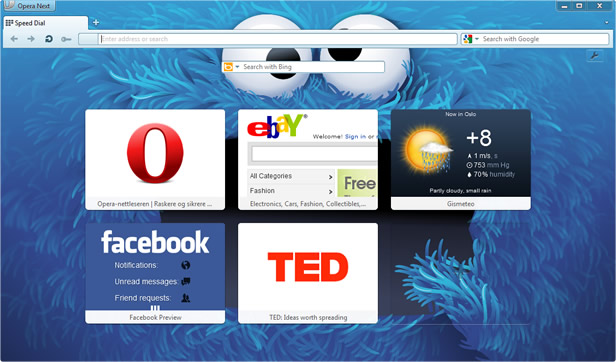
Opera Software has released the beta version of Opera 12, codenamed “Wahoo”, and it is the latest entry in Opera’s line of desktop web browsers. Opera 12 is both smarter and faster than its predecessors and introduces new features for both developers and consumers to play with ahead of the final launch. An added feature in Opera 12 is themes. Themes gives you an easy way to change the look of Opera to suit your tastes or your mood. To try a theme for Opera 12 beta, click this link. Themes are also easy to make. If you want to try your hand at making a theme for Opera, learn how to do it here.


Plug-ins are a leading cause of browser instability, so Opera has now given them their own process. This way, when a plug-in crashes, it doesn’t take Opera down with it. Furthermore, there are a few speed improvements as well due to optimizing the network SSL code and using smarter tab loading to accelerate start-up and shut-down times. Opera 12 shows some of the new tricks available to web developers by supporting getUserMedia, an API that allows web applications to use hardware like your computer’s built-in web cam. To try some demo applications, click here 


Now users can also layout webpages like a book with pages that can format automatically to the screen size. The project was formerly known as Opera Reader, but they have opened it up for standardization as CSS3 Generated Content for Paged Media. Opera upgraded its security badge to make it easier to understand the security and privacy policies of the sites you visit. With Opera 12, you can quickly see if a site is using your location information or wants to turn on your web cam. Opera 12 will come in Arabic, Farsi, Urdu and Hebrew thanks to new support and a remodeled interface for right-to-left scripts. The Opera extension platform now becomes more powerful with the introduction of Windows and Tabs APIs that allow extensions to control the windows and tabs in the browser.

A few other features have also been introduced :

  • 64-bit versions for Mac and Windows
  • Support for the Do Not Track header
  • CSS3 Animations and Transitions
  • HTML5 Drag and Drop
  • Support for CORS — not the beer, but rather Cross-Origin Resource Sharing
  • Opt-in hardware acceleration and WebGL


Source:-Tech2

DataWind launches Ubislate 7+ and 7C tablets in India


 Datawind, the company that made headlines with the Aakash tablet, has now announced the launch of two new 7-inch low-cost tablets - the Ubislate 7+ and Ubislate 7c with prices starting at Rs 2999 for the 7+. The 7c model will cost Rs 3,999.If you’ve pre-booked your Ubislate then your tablet is on its way to you. For the rest of us who weren’t pro-active, we’ll have to wait till the end of May to get our hands on a retail piece


Both the tablets come with similar specifications, only that the UbiSlate 7C comes with 4GB of internal flash memory compared to 2GB in the UbiSlate 7+, and the 7c has a capacitive touchscreen while the 7+ has a resistive screen.


Both the 7-inch tablets are powered by Cortex A8 800 Mhz processor, 256MB RAM and have an 800x480 pixel touchscreen. Datawind claims that the 3200 mAh battery will deliver upto 180 minutes of usage. The tablets run on Android 2.3 (Gingerbread)


Differentiated by a resistive screen on the UbiSlate 7+ to the four-point multi-touch capacitive screen on the UbiSlate 7C, both models come with embedded GPRS modems in addition to Wi-Fi connectivity allowing ubiquitous internet access. The 7” screen tablets support the Android 2.3 operating system that delivers a rich touch-screen graphical user interface which significantly reduces the learning curve for new computer users in joining the world-wide web. The tablets are powered by an 800Mh Cortex-A8 processor which allows smooth usability of a broad range of applications. The embedded HD video co-processor delivers high quality video content making it a perfect multimedia device. 


The tablets have microUSB slots for memory expansion and also include an USB port, that can also be used for optional 3G USB modems.


For customers who have pre-booked the UbiSlate 7+ from the Datawind website, the shipments have already started, said the company and will continue for the next few months before retail availability. The UbiSlate 7C will be available from end of May.Both the Datawind UbiSlate 7+ and the UbiSlate 7C tablets support WiFi and GPRS (SIM and phone functionality).


Here are some of the highlights of the Ubislate 7+ and 7C

  • Android 2.3
  • 800MHz Cortex-A8
  • 7-inch display with a resolution of 800 x 480 (7+ has resistive screen while 7C has capacitive)
  • 2GB internal storage for 7+ and 4GB for 7C
  • 256MB RAM
  • Wi-Fi a/b/g, , Standard USB 2.0


Download a movie or game using utorrent and bittorrent

In this tutorial, I am going to show you how to download movies or games or anything from internet using utorrent and bit torrent. First of all, you need to have u torrent or bit torrent installed in your PC. Follow these links to download utorrent and bit torrent:-


Download utorrent
Download bit Torrent


You can download any of the above mentioned software. It doesn’t matter which software you have. Both of these have the same layout and are easy to use and also very efficient. In this tutorial, I am going to use utorrent. Bit torrent can we used in the same manner as utorrent is used.  So follow these steps:-
  • Download the torrent of the desired file. If you want to learn how to download a torrent, follow this link :- Learn how to download a good torrent.
  • After the torrent is downloaded, open utorrent. Click on the add torrent button located at the top right corner of the screen.
  • A dialog box will appear. Choose the torrent that you have downloaded. Then another dialog box will come that will ask you to specify the path were you are going to download the concerned file.
  • After this,  the downloading will start. If you want to increse the downloading speed a bit, right click the torrent and then go to properties. Here in the maximum upload rate box enter 1 and click OK.

The downloading will get started. Wait till it is complete. After that Enjoy!!!

How to search a good torrent

In this tutorial , I am goind to show you how to download a good torrent of movies or games or anything from internet.
  • First of all, you need to download a torrent file. It is simply a data about a target file. To search these torrents, open torrentz.eu.

  • Search the desired file by typing its name in the search bar. 
  • After searching, many results will be displayed. Now you need to look for a suitable file. For example, if you want to download a movie, search for a file that is of between 690 to 800 mb because movies are generally of this size. But there are some exceptions like in case of full HD Blu-ray movies, there size can be up to 10 GB.  In case of games, first find the size of the game and then look for it. Then in the contents of that torrent file, see that whether the setup is in the form of .exe or ISO or any compatible size that you know how to install.
  • After this, you need to look for seeds. Seeds are the sources of your torrent file. More the seeds, more is the source and hence a greater speed. These are shown by green digits on the right side of the torrent file.

  • Once you have found a good file, open it. 
  • Now you are going to download it. If the torrent is available on monova.org (written as mnova.org), then download it from there by clicking on “Download via Torrent “ but don’t forgot to see the seeds. After clicking this, the torrent file will start downloading. If the torrent is not available in monova.org, then look for it in any other site. 

Your torrent file will get downloaded. Now if you want to learn how to download a file using this torrent, follow this link:-

Thursday, April 26, 2012

First BlackBerry 10 handset to make mid-August appearance


It is not news that BlackBerry is lagging behind as far as their operating system is concerned compared to the likes of Android and iOS who have completely dominated the smartphone sphere in recent years. To amend this situation, BlackBerry announced the BlackBerry 10 OS which would put them in contention as a top smartphone manufacturer. Late last year, former Research in Motion CEO stated that the first device running this upcoming operating system would make its first appearance by the end of 2012. 


It does not come as a surprise that the first handset will be a touch only handset as there have been leaks in the past showing off a sleek looking full touchscreen handset running on what appears to be their next operating system. The device had been codenamed BlackBerry Londonand at the time there were some specifications revealed.


Here is a look at the rumoured specification list of the BlackBerry London 

  • BlackBerry 10 OS
  • 3.7-inch touchscreen
  • 1.5GHz TI OMAP dual-core CPU
  • 1GB RAM
  • 16GB internal memory
  • 8 Megapixel rear camera
  • 2 Megapixel front camera

For those who love BlackBerry handsets because of their physical keypad, the report also details when the first handset running BlackBerry 10 OS with this feature will debut. The report states that by the first quarter of 2013, the first handset running on BlackBerry 10 using a physical QWERTY keypad is expected to be released. 


Source:- Tech2

SmartHome Revolution

There are many mundane tasks in life we have to do and managing them all isn’t easy. We can’t water the plants when we are out, we c...